Inhalt
Vorheriges Thema
Nächstes Thema
5. Diagramme der strukturierten Programmierung
5. Diagramme der strukturierten Programmierung
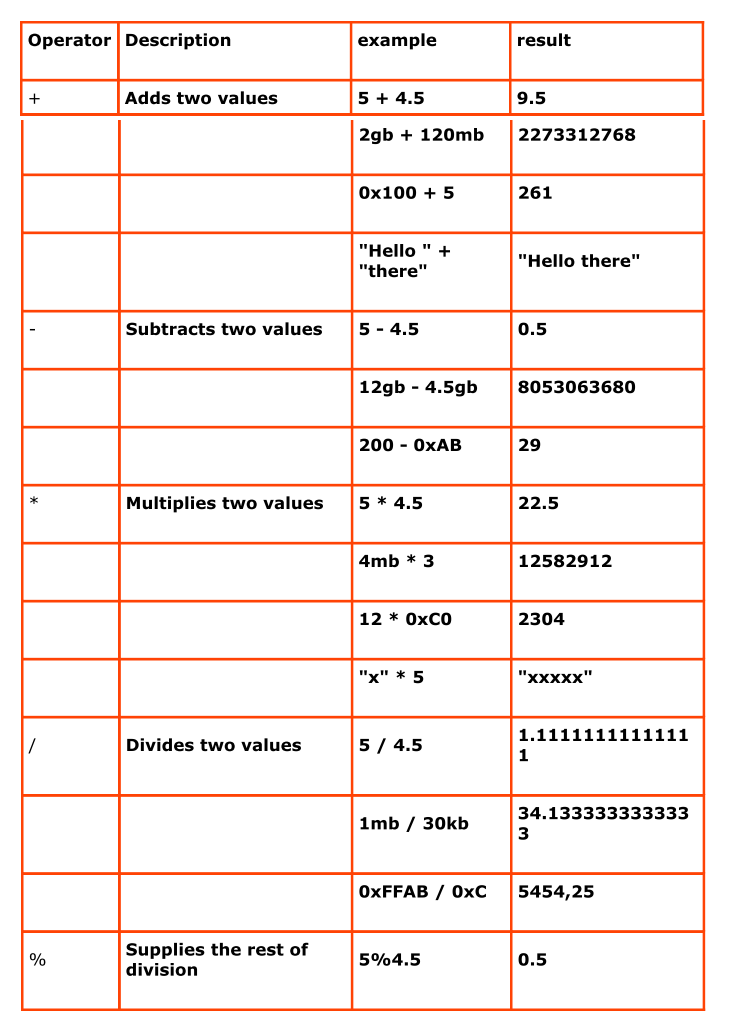
Variablen werden häufig mit Hilfe von Operatoren weiterverarbeitet. Die gängigsten Operatoren sind die mathematischen Operatoren wie Addition, Multiplikation, Division,etc. Im Anhang finden Sie eine Übersicht Mathematische Operatoren.
| Variable | Bedeutung |
|---|---|
| $^ | Contains the first token of the last line input into the shell |
| $$ | Contains the last token of the last line input into the shell |
| $_ | The current pipeline object; used in script blocks, filters, Where-Object, ForEach-Object, and Switch |
| $? | Contains the success/fail status of the last statement |
| $Args | Used in creating functions requiring parameters |
| $Error | If an error occurred, the error object is saved in the $error variable. |
| $ExecutionContext | The execution objects available to cmdlets |
| $foreach | Refers to the enumerator in a foreach loop |
| $HOME | The user’s home directory; set to %HOMEDRIVE%%HOMEPATH% |
| $Input | Input is piped to a function or code block. |
| $Match | A hash table consisting of items found by the -match operator |
| $MyInvocation | Information about the currently executing script or command-line |
| $PSHome | The directory where PS is installed |
| $Host | Information about the currently executing host |
| $LastExitCode | The exit code of the last native application to run |
| $true | Boolean TRUE |
| $false | Boolean FALSE |
| $null | A null object |
| $this | In the Types.ps1xml file and some script block instances, this represents the current object |
| $OFS | Output Field Separator used when converting an array to a string |
| $ShellID | The identifier for the shell. This value is used by the shell to determine the ExecutionPolicy and what profiles are run at Startup |
| $StackTrace | Contains detailed stack trace information about the last error |
| Operator | klassisch | Beschreibung | Beispiel | Ergebnis |
|---|---|---|---|---|
| -eq,-ceq, -ieq | = | Gleichheit | 10 -eq 15 | $true |
| -ne, -cne, -ice | <> | Ungleichheit | 10 -ne 15 | $true |
| -gt,-cgt, -igt | > | Größer | 10 -gt 15 | $false |
| -ge,-cge, -ige | >= | Größer gleich | 10 -ge 15 | $false |
| -lt,-clt, -ilt | < | Kleiner | 10 -lt 15 | $true |
| -le,-cle, -ile | <= | Kleiner gleich | 10 -le 15 | $true |
| -contains [#]_ | Enthält | 1,2,3 -contains 1 | $true | |
| -notcontains | Nicht enthält | 1,2,3 -notcontains 1 | $false | |
| -is | Typgleichheit | $feld -is [array] | $true | |
| -like | Wildcard | |||
| -notlike | Wildcard | |||
| -match | regulärer Ausdruck | |||
| -notmatch | regulärer Ausdruck |