Überblick
Neben der Abfrage von Bedingungen muss der Programmierer häufig durch Listen iterieren, so muss er z.B. häufig die Inhalte von Arrays ausgeben.
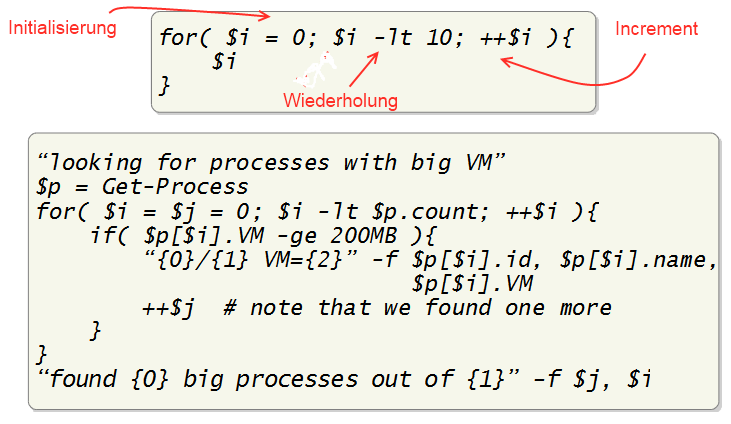
Die einfachste Art des Schleifendurchlaufs ist der mittels des for-Statements, gerne auch Zählschleife genannt. Es hat 3 grundlegende Elemente:
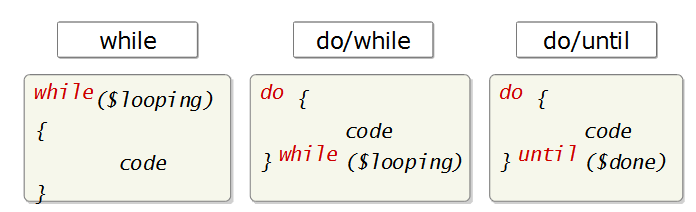
Do and While sind prinzipiell Endlosschleifen. Solange die Abbruchbedingung nicht true ergibt, werden beide Schleifen endlos durchlaufen.
Do {
        $input = Read-Host "Your homepage"
} While (!($input -like "www.*.*"))


$input = Read-Host "Your homepage"
while(!($input -like "www.*.*"))
{
        $input = Read-Host "Your homepage"
}
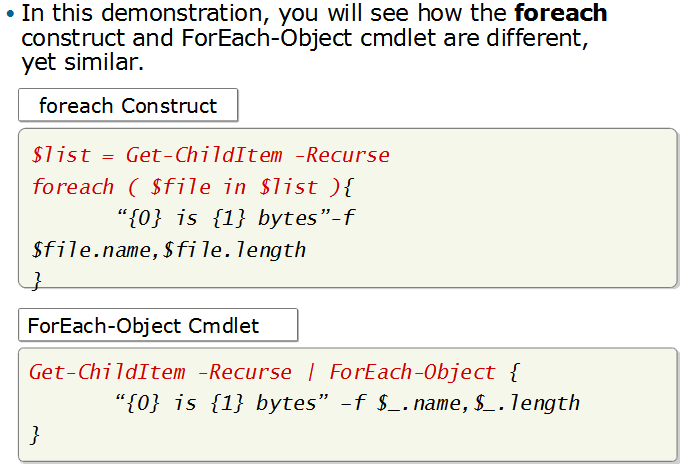
Die foreach-Anweisung iteriert über eine Liste von Objekten. Sie sollte nicht innerhalb einer Pipeline angwendet werden, weil sie dort auf das Ergebnis der Pipeline warten muss; innerhalb von Pipelines ist das foreach-Objekt die geeignete Wahl.
# Create your own array:
$array = 3,6,"Hello",12
# Read out this array element by element:
Foreach ($element in $array)
{
        "Current element: $element"
}
Current element: 3
Current element: 6
Current element: Hello
Current element: 12
Mit Hilfe des break-Statements können Schleifen vorzeitig verlassen werden. Eine eventuell noch zu durchlaufende Abbruchbedingung wird nicht mehr ausgewertet.
While ($true)
{
  $password = Read-Host "Enter password"
  If ($password -eq "secret") {break}
}

For ($i=1; $i -lt 4; $i++)
{
  $password = Read-Host "Enter password ($i. try)"
  If ($password -eq "secret") {break}
  If ($i -ge 3) { Throw "The entered password was incorrect." }
}
Mit Hilfe von continue können Sie den jeweils aktuellen Schleifendurchlauf beenden, ohne die Schleife selbst zu beenden.
Das folgende Beispiel gibt nur die Länge von Dateien aus; sollte es auf Ordner stoßen, werden diese sofort übersprungen.
Foreach ($entry in Dir $env:windir)
{
  # If the current element matches the desired type,
  # continue immediately with the next element:
  If (!($entry -is [System.IO.FileInfo])) { Continue }
  "File {0} is {1} bytes large." -f $entry.name, $entry.length
}
The cmdlet ForEach-Object gives you the option of processing single objects of the PowerShell pipeline, such as to output the data contained in object properties as text or to invoke methods of the object.
Foreach is a similar type of loop whose contents do not come from the pipeline, but from an array or a collection. In addition, there are endless loops that iterate a code block until a particular condition is met.
The simplest type of such loops is While, in which continuation criteria are checked at the beginning of the loop. If you want to do the checking at the end of the loop, choose Do...While. The For loop is an extended While loop, because it can count loop cycles and automatically terminate the loop after a designated number of iterations. This means that For is suited mainly for loops in which counts are to be made or which must complete a set number of iterations.
Do...While and While, on the other hand, are suited for loops that have to be iterated as long as the respective situation and running time conditions require it.
Finally, Switch is a combined Foreach loop with integrated conditions so that you can immediately implement different actions independently of the read element. Moreover, Switch can step through the contents of text files line by line and evaluate even log files of substantial size.
All loops can exit ahead of schedule with the help of Break and skip the current loop cycle with the help of Continue. In the case of nested loops, you can assign an unambiguous name to the loops and then use this name to apply Break or Continue to nested loops.