Die bisherige Arbeit mit der PS legte den Wert auf Elemente der strukturierten Programmierung, z.B. Bedingungen, Schleifen, Funktionen; Werte wurden häufig nur in Form von Variablen bzw. Arrays übergeben.
Die Beschäftigung mit der Pipeline führte den Ansatz weiter fort, indem man nun von Objekten spricht, die man nun innerhalb der Pipeline weitergibt.
Objekte setzen die Vielzahl von Informationen zu einem einheitlichen Ganzen zusammen; sie verpacken die bisher in einzelnen Variablen gehaltenen Informationen zu einem sinnvollen Gesamtbild.
Bemerkung
Goldene Regel der PowerShell
Eine Funktion oder ein Cmdlet sollte immer ein Objekt zurückgeben!
Wenn man kein fertiges Objekt hat und Daten aus verschiedenen Quellen zusammen sammelt, dann muss man sich eben ein eigenes Objekt zusammen bauen!
Das Erzeugen eines eigenen Objektes kann aus vielerlei Weise erfolgen.
PS 2.0: New-Object mit Add-Member
Dies ist der in PowerShell Version 2.0 vorgesehene Weg um PCCustomObjects zu erstellen.
Ein leeres Objekt erstellen und dann die NoteProperties nachträglich mit dem Cmdlet Add-Member anfügen:
# Neues leeres Objekt erstellen
$Obj= New-object -TypeName PSObject


# Wert an das Objekt anfügen
Add-Member -InputObject $Obj -Name Wert1 -Value 1 -MemberType NoteProperty
# Wert an das Objekt anfügen
Add-Member -InputObject $Obj -Name Wert2 -Value 2 -MemberType NoteProperty
# Wert an das Objekt anfügen
Add-Member -InputObject $Obj -Name Wert3-Value 3 -MemberType NoteProperty
# CSV Export der Daten
Export-Csv -InputObject $Obj -Path "C:\Temp\test.csv" –NoTypeInformation
Select-Object
$StrObj=“” | Select-Object Wert1,Wert2,Wert3
# Werte an die NoteProperties zuweisen

$StrObj.Wert1 = "Hello"
$StrObj.Wert2 = 2
$StrObj.Wert3 = 3

$StrObj.GetType()
$StrObj | Get-Member -Name Wert2
New-Module –asCustomObject
Da alles in PowerShell ein Objekt ist, ist auch ein Modul “nur” ein Objekt mit Methoden (Function) und Feldern (Property).
Deshalb kann man mit dem Cmdlet New-Module sowie dem Parameter –asCustomObject und einem Scriptblock ein Objekt erstellen.
Der Vorteil hierbei ist, dass es viel leichter ist diesem Objekt neuen Methoden (Functions) oder neue Properties anzufügen.
Die bisher gezeigten NoteProperties können jeden Typen annehmen. Die Properties des Objektes, das über New-Modul erstellt wird, können stark Typisiert werden. So dass die Zuweisung eines falschen Wertes in einer Fehlermeldung enden.
$Objekt = New-Module -AsCustomObject -ScriptBlock {
        [int]$Wert1=$null; # Objekt Property als Integer definieren
        Export-ModuleMember -Variable * # Variablen Public machen
}

$Obj2 = New-Module -AsCustomObject -ScriptBlock {

        [int]$Wert1 = $null; # Objekt Property als Integer definieren
        [int]$Wert2 = $null; # Objekt Property als Integer definieren

        # Methode definieren
        Function Add {
                $Wert1+$Wert2 # Zahlen Addieren
        }

        Export-ModuleMember -Variable * -Function *  # Variablen und Funktionen Public machen
}

# Werte füllen
$Obj2.Wert1 = 4
$Obj2.Wert2 = 4
$Obj2.Add() # Funktion ausführen
.NET-Code
# Eine Klasse mit C# Code und Add-Type definieren

add-type @"
using System;
public class myClass{
        public Double number=0;

        public Double Sqr()
        {
                return Math.Pow(number,2.0);
        }
}
"@
# Das vorher definierte Objekt erstellen
$obj = New-Object myClass
# Der Property des Objektes einen Wert zuweisen
$obj.number = 5
# Methode des Objektes ausführen
$obj.Sqr()
Objekte sind immer dann sinnvoll, wenn
Im folgenden Beispiel will man die vorhandenen Eigenschaften eines zurückgegebenen Objektes in einer anderen Form darstellen.

Die Eigenschaft csname ist wenig aussagekräftig. Diese und weitere Eigenschaften können durch folgendes Skript geändert werden.
get-wmiobject win32_operatingsystem | `
Select @{Name="Computername";Expression={$_.CSName}}, `
Version,@{Name="OS";Expression={$_.Caption}}, `
@{Name="LastBoot";Expression={$_.ConvertToDateTime($_.LastBootUpTime)}}

`
Der Code in einem Skriptblock kann beliebig sein. So kann die z.B. die LastBootUpTime auch schöner formatiert werden.
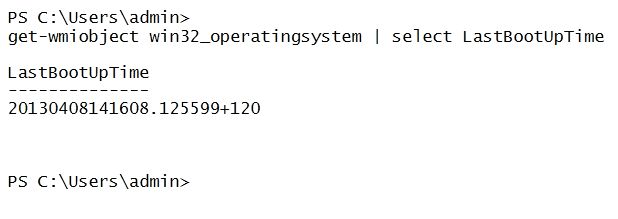
Die Rückgabe des Select-Commandlets ist ein echtes Objekt. Dies erkennt man an dem Nachschalten des Get-Member-CmdLets
get-wmiobject win32_operatingsystem | `
Select @{Name="Computername";Expression={$_.CSName}}, `
Version,@{Name="OS";Expression={$_.Caption}}, `
@{Name="LastBoot";Expression={$_.ConvertToDateTime($_.LastBootUpTime)}} | get-member

`

TypeName: Selected.System.Management.ManagementObject

Name         MemberType   Definition
----         ----------   ----------
Equals       Method       bool Equals(System.Object obj)
GetHashCode  Method       int GetHashCode()
GetType      Method       type GetType()
ToString     Method       string ToString()
Computername NoteProperty System.String Computername=STEINAM-LAPTOP
LastBoot     NoteProperty System.DateTime LastBoot=08.04.2013 14:16:08
OS           NoteProperty System.String OS=Microsoft Windows 7 Enterprise
Version      NoteProperty System.String Version=6.1.7601
Mit diesem Objekt können nun weitere Dinge getan werden, z.B. das Sortieren nach der Bootzeit
get-wmiobject win32_operatingsystem -computername "localhost", "127.0.0.1" | `
Select @{Name="Computername";Expression={$_.CSName}}, `
Version,@{Name="OS";Expression={$_.Caption}}, `
@{Name="LastBoot";Expression={$_.ConvertToDateTime($_.LastBootUpTime)}} | `
Sort LastBoot -Descending | format-table –autosize


Computername   Version  OS                              LastBoot
------------   -------  --                              --------
STEINAM-LAPTOP 6.1.7601 Microsoft Windows 7 Enterprise  08.04.2013 14:16:08
STEINAM-LAPTOP 6.1.7601 Microsoft Windows 7 Enterprise  08.04.2013 14:16:08
Der Nachteil des Verfahrens ist, dass das Original-Objekt verloren wurde.
Aufgabe
Auf welchem Rechner läuft der Druck-Spooler-Dienst. Zeigen Sie den Namen der Maschine sowie die Anzahl der benötigten Dienste.
Eine erste Annäherung:
PS C:\Users\admin> Get-Service Spooler | select machinename, RequiredServices

MachineName                             RequiredServices
-----------                             ----------------
.                                       {HTTP, RPCSS}
Falls die Druckspooler-Dienst auf dem eigenen Rechner (.) läuft, soll der Computername ausgegeben werden.
 Get-Service Spooler | select @{Name="Computername";Expression={
         if($_.Machinename -eq ".")
         {
                 $env:COMPUTERNAME

         }
    }
}, RequiredServices

Computername                            RequiredServices
------------                            ----------------
STEINAM-LAPTOP                          {HTTP, RPCSS}
Die Anzahl der benötigten Dienste muss noch ermittelt werden. Bisher werden nur die Dienstnamen ausgegeben. Informieren Sie sich dazu über das Measure-Cmdlet.
 Get-Service Spooler | select @{Name="Computername";Expression={
 if($_.Machinename -eq ".")
 {
     $env:COMPUTERNAME
 }
 }
 },
 @{Name="Anzahl Dienste"; Expression= {($_.RequiredServices | Measure).count }}, Name, DisplayName


Computername             Anzahl Dienste Name                DisplayName
------------             -------------- ----                -----------
STEINAM-LAPTOP                        2 Spooler             Druckwarteschlange
Auch hier geht das ursprüngliche Objekt verloren. Dies kann durch den nun folgenden Teil vermieden werden.
Hinzufügen neuer Objekteigenschaften mit Hilfe von Add-Member
Auch zu einem bestehenden Objekt können neue Eigenschaften hinzugefügt werden.
Get-Service Spooler | Add-Member -MemberType NoteProperty -Name "Foo" -Value 123 -PassThru
Mit Hilfe des passthru-Parameters wird die neue Eigenschaft mit in die Pipeline geworfen.
Beispiel
Informationen über logische Laufwerke per WMI
PS C:\> Get-WmiObject win32_logicaldisk
Ein Filter um nur lokale und removable Laufwerke zu sehen:
PS C:> Get-WmiObject win32_logicaldisk -Filter “drivetype=2 or drivetype=3”
Alright now that I have this I want to turn it into a nice table showing the name, freespace, and size, but freespace and size are in bytes, which I just cant stand looking at. Lets use Add-Member to create a couple of script properties and turn them into rounded GB.
PS C:\> Get-WmiObject win32_logicaldisk -Filter "drivetype=2 or drivetype=3" | Add-Member -MemberType ScriptProperty -Name FreeSpaceinGB -Value {[math]::Round(($this.freespace / 1GB),2)} -PassThru | Format-Table Name,FreespaceinGB -AutoSize
Lastly I am going to use another add-member cmdlet to add a second property and get closer to my desired result. I still want to go another step, but first lets just look at the results with two properties added:
PS C:\> Get-WmiObject win32_logicaldisk -Filter "drivetype=2 or drivetype=3" | Add-Member -MemberType ScriptProperty -Name FreeSpaceinGB -Value {[math]::Round(($this.
freespace / 1GB),2)} -PassThru | Add-Member -MemberType ScriptProperty -Name SizeinGB -Value {[math]::Round(($this.size / 1GB),2)} -PassThru | Format-Table name,FreespaceinGB,SizeinGB -AutoSize
Und jetzt noch den Anteil des freien Platzes in Prozent
Get-WmiObject win32_logicaldisk -Filter "drivetype=2 or drivetype=3" | Add-Member -MemberType ScriptProperty -Name FreeSpaceinGB -Value {[math]::Round(($this.freespace / 1GB),2)} -PassThru | Add-Member -MemberType ScriptProperty -Name SizeinGB -Value {[math]::Round(($this.size / 1GB),2)} -PassThru | Add-Member -MemberTypeScriptProperty -Name FreespacePercent -Value {[math]::Round(([int64]$this.freespace / [int64]$this.size * 100),2)} -PassThru | Format-Table Name,FreespaceinGB,SizeinGB,FreespacePercent
Add-member hat die darunter liegenden .NET-Objekte nicht verändert, sondern um die Eigenschaften erweitert.
Get-WmiObject win32_logicaldisk -Filter "drivetype=2 or drivetype=3" | Add-Member -MemberType ScriptProperty -Name FreeSpaceinGB -Value {[math]::Round(($this.freespace / 1GB),2)} -PassThru | Add-Member -MemberType ScriptProperty -Name SizeinGB -Value {[math]::Round(($this.size / 1GB),2)} -PassThru | Add-Member -MemberType ScriptProperty -Name FreespacePercent -Value {[math]::Round(([int64]$this.freespace / [int64]$this.size * 100),2)} -PassThru | Get-Member
PowerShell v3 brings the possibility to create a custom object via
PS V3 bringt die Möglichkeit mit, eigene Objekte mit Hilfe von [pscustomobject] anzulegen.
BeispieL
$CustomObject2 = [pscustomobject]@{a=1; b=2; c=3; d=4}
$CustomObject2 | Format-List
Die Ausgabe von Get-Member zeigt, dass Note-Properties angelegt wurden
$CustomObject2 | Get-Member


TypeName: System.Management.Automation.PSCustomObject

Name        MemberType   Definition
----        ----------   ----------
Equals      Method       bool Equals(System.Object obj)
GetHashCode Method       int GetHashCode()
GetType     Method       type GetType()
ToString    Method       string ToString()
a           NoteProperty System.Int32 a=1
b           NoteProperty System.Int32 b=2
c           NoteProperty System.Int32 c=3
d           NoteProperty System.Int32 d=4
Warum sollte man diesen Weg wählen.
Im Vergleich zum Anlegen mit Hilfe von Hashtabellen bleibt die Einfügereihenfolge erhalten.
$HashTableOld = @{a=1; b=2; c=3; d=4}

$HashTableOld

Name                           Value
----                           -----
c                              3
d                              4
b                              2
a                              1
Der 2. Grund ist die deutlich erhöhte Geschwindigkeit zu allen anderen Möglichkeiten der Objekterzeugung. Folgendes Beispiel zeigt einen Geschwindigkeitsvergleich.
Write-Host "PS V2 Customobject"

$TestSelect = {
(0..5000) | ForEach-Object {$CustomObject = "" | Select-Object Name,ID
        $CustomObject.Name = "Test Name"
        $CustomObject.ID = $_
        $CustomObject
        }
}
Measure-Command $TestSelect | Format-Table TotalSeconds -Autosize


Write-Host "new-object und add-member"

$TestAddMember = {
(0..5000) | ForEach-Object {
        $CustomObject = New-Object psobject
        $CustomObject | Add-Member -Name "Name" -MemberType NoteProperty -Value "Test"
        $CustomObject | Add-Member -Name "ID"  -MemberType NoteProperty -Value $_
$CustomObject
        }
}
Measure-Command $TestAddMember | Format-Table TotalSeconds -Autosize


Write-Host "New-Object und hash"


$TestProperty = {
        (0..5000) | ForEach-Object {New-Object psobject -Property @{Name = "Test Name"; ID = $_}}
}
Measure-Command $TestProperty | Format-Table TotalSeconds -Autosize


Write-Host ".net-Objekte"


add-type @"
using System;
public class TestObject2{
        public string name = "";
        public int wert = 0;
}
"@
Measure-Command {
        0..5000 | ForEach-Object {
                $dotnet = New-Object TestObject2
                $dotnet.name = $_.ToString()
                $dotnet.wert = $_
                $dotnet
        } | Format-Table TotalSeconds -Autosize
}


Write-Host "pscustomobjects"


$TestPSCustomObject = {
        (0..5000) | ForEach-Object {[pscustomobject]@{Name = "Test Name"; ID = $_}}
}
Measure-Command $TestPSCustomObject | Format-Table TotalSeconds -Autosize
Ein weiteres Skriot vergleicht die Geschwindigkeit beim Erzeugen einer größeren Menge von Objekten anhand dreier unterschiedlicher Wege der Objekterzeugung.
[int[]]$objects = 1,2,5,10
[int]$cycles = 50000
$report = @()
ForEach ($obj in $objects) {
Switch ($obj) {
    1   {
            $temp = “” | Select Name, Objects,Cycles, Seconds
            Write-Host -fore Green “Beginning performance test for Add-Member custom objects using $cycles iterations and $($obj) objects”
            $run = $(Measure-Command {
                        for($i = 0;$i -lt $cycles;$i++)  {
                            $a = new-Object psobject
                            $a | add-member -membertype noteproperty -name test1 -value "test1"
            }}).TotalSeconds
            Write-Host -ForegroundColor Cyan "$($run) seconds"
            $temp.Name = “Add-Member”
            $temp.Objects = $obj
            $temp.Cycles = $cycles
            $temp.seconds = $run
            $report += $temp
        }
    2   {
            $temp = "" | Select Name, Objects,Cycles, Seconds
            Write-Host -fore Green "Beginning performance test for Add-Member custom objects using $cycles iterations and $($obj) objects"
            $run = $(Measure-Command {for($i = 0;$i -lt $cycles;$i++)  {
                        $a = new-Object psobject
                        $a | add-member -membertype noteproperty -name test1 -value “test1"
                        $a | add-member -membertype noteproperty -name test2 -value “test2"
                    }}).TotalSeconds
            Write-Host -ForegroundColor Cyan "$($run) seconds"
            $temp.Name = “Add-Member”
            $temp.Objects = $obj
            $temp.Cycles = $cycles
            $temp.seconds = $run
            $report += $temp
        }
    5   {
            $temp = "" | Select Name, Objects,Cycles, Seconds
            Write-Host -fore Green “Beginning performance test for Add-Member custom objects using $cycles iterations and $($obj) objects”
            $run = $(Measure-Command {
                        for($i = 0;$i -lt $cycles;$i++)  {
                            $a = new-Object psobject
                            $a | add-member -membertype noteproperty -name test1 -value "test1"
                            $a | add-member -membertype noteproperty -name test2 -value "test2"
                            $a | add-member -membertype noteproperty -name test3 -value "test3"
                            $a | add-member -membertype noteproperty -name test4 -value "test4"
                            $a | add-member -membertype noteproperty -name test5 -value "test5"
                    }}).TotalSeconds
            Write-Host -ForegroundColor Cyan “$($run) seconds”
            $temp.Name = "Add-Member"
            $temp.Objects = $obj
            $temp.Cycles = $cycles
            $temp.seconds = $run
            $report += $temp
        }
    10  {
            $temp = "" | Select Name, Objects,Cycles, Seconds
            Write-Host -fore Green "Beginning performance test for Add-Member custom objects using $cycles iterations and $($obj) objects"
            $run = $(Measure-Command {for($i = 0;$i -lt $cycles;$i++)  {
                        $a = new-Object psobject
                        $a | add-member -membertype noteproperty -name test1 -value "test1"
                        $a | add-member -membertype noteproperty -name test2 -value “test2"
                        $a | add-member -membertype noteproperty -name test3 -value "test3"
                        $a | add-member -membertype noteproperty -name test4 -value "test4"
                        $a | add-member -membertype noteproperty -name test5 -value "test5"
                        $a | add-member -membertype noteproperty -name test6 -value "test6"
                        $a | add-member -membertype noteproperty -name test7 -value "test7"
                        $a | add-member -membertype noteproperty -name test8 -value "test8"
                        $a | add-member -membertype noteproperty -name test9 -value "test9"
                        $a | add-member -membertype noteproperty -name test10 -value "test10"
                    }}).TotalSeconds
            Write-Host -ForegroundColor Cyan "$($run) seconds"
            $temp.Name = "Add-Member"
            $temp.Objects = $obj
            $temp.Cycles = $cycles
            $temp.seconds = $run
            $report += $temp
        }
    }

    Switch ($obj) {
    1 {
        $temp = "" | Select Name, Objects,Cycles, Seconds
        Write-Host -fore Green "Beginning performance test for Select-Object custom objects using 50000 iterations and $($obj) objects"
        $run = $(Measure-Command {for($i = 0;$i -lt 50000;$i++) {
            $a = 1 |Select-Object test1,test2,test3,test4,test5,test6,test7,test8,test9,test10
            $a.test1 = "test1"
        }}).TotalSeconds
        Write-Host -ForegroundColor Cyan “$($run) seconds”
        $temp.Name = "Select-Object"
        $temp.Objects = $obj
        $temp.Cycles = $cycles
        $temp.seconds = $run
        $report += $temp
      }
    2 {
        $temp = "" | Select Name, Objects,Cycles, Seconds
        Write-Host -fore Green "Beginning performance test for Select-Object custom objects using $cycles iterations and $($obj) objects"
        $run = $(Measure-Command {for($i = 0;$i -lt $cycles;$i++) {
                $a = 1 |Select-Object test1,test2,test3,test4,test5,test6,test7,test8,test9,test10
                $a.test1 = "test1"; $a.test2 = "test2"
        }}).TotalSeconds
        Write-Host -ForegroundColor Cyan "$($run) seconds"
        $temp.Name = "Select-Object"
        $temp.Objects = $obj
        $temp.Cycles = $cycles
        $temp.seconds = $run
        $report += $temp
      }
    5 {
        $temp = "" | Select Name, Objects,Cycles, Seconds
        Write-Host -fore Green "Beginning performance test for Select-Object custom objects using $cycles iterations and $($obj) objects"
        $run = $(Measure-Command {for($i = 0;$i -lt $cycles;$i++) {
            $a = 1 |Select-Object test1,test2,test3,test4,test5,test6,test7,test8,test9,test10
            $a.test1 = "test1"; $a.test2 = "test2"; $a.test3 = "test3"; $a.test4 = "test4"; $a.test5 = "test5"
        }}).TotalSeconds
        Write-Host -ForegroundColor Cyan "$($run) seconds"
        $temp.Name = "Select-Object"
        $temp.Objects = $obj
        $temp.Cycles = $cycles
        $temp.seconds = $run
        $report += $temp
      }
    10{
        $temp = "" | Select Name, Objects,Cycles, Seconds
        Write-Host -fore Green "Beginning performance test for Select-Object custom objects using $cycles iterations and $($obj) objects"
        $run = $(Measure-Command {for($i = 0;$i -lt $cycles;$i++) {
            $a = 1 |Select-Object test1,test2,test3,test4,test5,test6,test7,test8,test9,test10
            $a.test1 = "test1"; $a.test2 = "test2"; $a.test3 = "test3"; $a.test4 = "test4"; $a.test5 = "test5"
            $a.test6 = "test6"; $a.test7 = "test7"; $a.test8 = "test8"; $a.test9 = "test9"; $a.test10 = “test10"
        }}).TotalSeconds
        Write-Host -ForegroundColor Cyan "$($run) seconds"
        $temp.Name = “Select-Object”
        $temp.Objects = $obj
        $temp.Cycles = $cycles
        $temp.seconds = $run
        $report += $temp
      }
    }

    Switch ($obj) {
    1 {
        $temp = "" | Select Name, Objects,Cycles, Seconds
        Write-Host -fore Green "Beginning performance test for Hash Table custom objects using $cycles iterations and $($obj) objects"
        $run = $(Measure-Command {for($i = 0;$i -lt $cycles;$i++) {
                    New-Object PSObject -Property @{
                    test1 = "test1"
                    }
                }}).TotalSeconds
        Write-Host -ForegroundColor Cyan "$($run) seconds"
        $temp.Name = "HashTable"
        $temp.Objects = $obj
        $temp.Cycles = $cycles
        $temp.seconds = $run
        $report += $temp
      }
    2 {
        $temp = "" | Select Name, Objects,Cycles, Seconds
        Write-Host -fore Green "Beginning performance test for Hash Table custom objects using $cycles iterations and $($obj) objects"
        $run = $(Measure-Command {for($i = 0;$i -lt $cycles;$i++) {
                    New-Object PSObject -Property @{
                      test1 = "test1"; test2 = "test2"
                    }
        }}).TotalSeconds
        Write-Host -ForegroundColor Cyan "$($run) seconds"
        $temp.Name = "HashTable"
        $temp.Objects = $obj
        $temp.Cycles = $cycles
        $temp.seconds = $run
        $report += $temp
       }
    5 {
        $temp = "" | Select Name, Objects,Cycles, Seconds
        Write-Host -fore Green "Beginning performance test for Hash Table custom objects using $cycles iterations and $($obj) objects"
        $run = $(Measure-Command {for($i = 0;$i -lt $cycles;$i++) {
            New-Object PSObject -Property @{
            test1 = "test1"; test2 = "test2"; test3 = "test3"; test4 = "test4"; test5 = "test5"
        }
        }}).TotalSeconds
        Write-Host -ForegroundColor Cyan “$($run) seconds”
        $temp.Name = "HashTable"
        $temp.Objects = $obj
        $temp.Cycles = $cycles
        $temp.seconds = $run
        $report += $temp
      }
    10{
        $temp = ""| Select Name, Objects,Cycles, Seconds
        Write-Host -fore Green "Beginning performance test for Hash Table custom objects using $cycles iterations and $($obj) objects"
        $run = $(Measure-Command {for($i = 0;$i -lt $cycles;$i++) {
            New-Object PSObject -Property @{
                test1 = "test1"; test2 = "test2"; test3 = "test3"; test4 = "test4"; test5 = "test5"
                test6 = "test6"; test7 = "test7"; test8 = "test8"; test9 = "test9"; test10 = "test10"
            }
        }}).TotalSeconds
        Write-Host -ForegroundColor Cyan "$($run) seconds"
        $temp.Name = “HashTable”
        $temp.Objects = $obj
        $temp.Cycles = $cycles
        $temp.seconds = $run
        $report += $temp
       }
    }


    Switch ($obj) {
    1 {
        $temp = "" | Select Name, Objects,Cycles, Seconds
        Write-Host -fore Green "Beginning performance test for psCustomObjects  using $cycles iterations and $($obj) objects"
        $run = $(Measure-Command {for($i = 0;$i -lt $cycles;$i++) {
                     [pscustomobject]@{Name = "Test Name"}
                }}).TotalSeconds
        Write-Host -ForegroundColor Cyan "$($run) seconds"
        $temp.Name = "HashTable"
        $temp.Objects = $obj
        $temp.Cycles = $cycles
        $temp.seconds = $run
        $report += $temp
      }
    2 {
        $temp = "" | Select Name, Objects,Cycles, Seconds
        Write-Host -fore Green "Beginning performance test for Hash Table custom objects using $cycles iterations and $($obj) objects"
        $run = $(Measure-Command {for($i = 0;$i -lt $cycles;$i++) {
                     [pscustomobject]@{Name = "Test Name"; ID = $i}
                    }
        }}).TotalSeconds
        Write-Host -ForegroundColor Cyan "$($run) seconds"
        $temp.Name = "HashTable"
        $temp.Objects = $obj
        $temp.Cycles = $cycles
        $temp.seconds = $run
        $report += $temp
       }
    5 {
        $temp = "" | Select Name, Objects,Cycles, Seconds
        Write-Host -fore Green "Beginning performance test for Hash Table custom objects using $cycles iterations and $($obj) objects"
        $run = $(Measure-Command {for($i = 0;$i -lt $cycles;$i++) {
            New-Object PSObject -Property @{
            [pscustomobject]@{Name = "Test Name"; ID = 1;Test3="test3";Test4 = "Test4";Test5="Test5"}
        }
        }}).TotalSeconds
        Write-Host -ForegroundColor Cyan “$($run) seconds”
        $temp.Name = "HashTable"
        $temp.Objects = $obj
        $temp.Cycles = $cycles
        $temp.seconds = $run
        $report += $temp
      }
    10{
        $temp = ""| Select Name, Objects,Cycles, Seconds
        Write-Host -fore Green "Beginning performance test for Hash Table custom objects using $cycles iterations and $($obj) objects"
        $run = $(Measure-Command {for($i = 0;$i -lt $cycles;$i++) {
            [pscustomobject]@{
                test1 = "test1"; test2 = "test2"; test3 = "test3"; test4 = "test4"; test5 = "test5"
                test6 = "test6"; test7 = "test7"; test8 = "test8"; test9 = "test9"; test10 = "test10"
            }
        }}).TotalSeconds
        Write-Host -ForegroundColor Cyan "$($run) seconds"
        $temp.Name = “HashTable”
        $temp.Objects = $obj
        $temp.Cycles = $cycles
        $temp.seconds = $run
        $report += $temp
       }
    }
}
$report